Introducing the Epic Games launcher

As you probably already know, Epic Games is gaining more and more ground in the field of digital platforms. Indeed, the success of Fortnite seems to have given wings to Epic Games, which is sweeping the lead on some of the biggest releases of February, for example, Metro Exodus. If you wait for that game with impatience, you will have no choice but to go through the platform of Epic Games to play on PC. Here is a little overview of this launcher. For starters, you need to download the launcher. To do so, go to the Epic Games website, and click on the "download Epic Games" button at the top right of the page. Or simply click on this link which will automatically launch the download. Is it necessary to specify that you will also need to create an account? That's done. During the download, take a look at our comparator, for example.
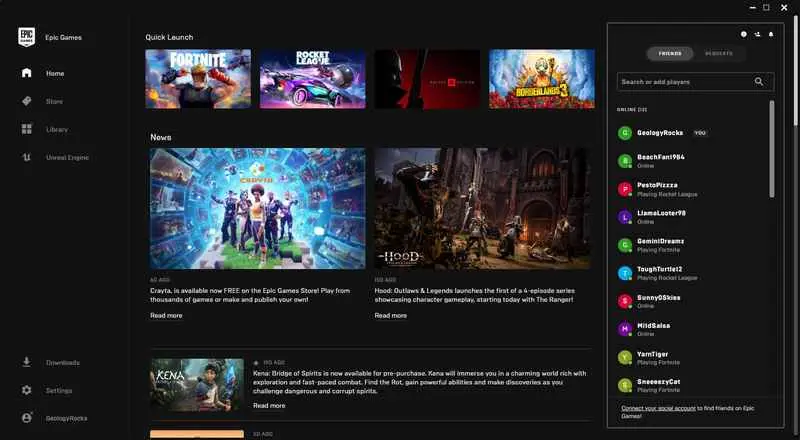
In the launcher, you will have access to a number of fairly standard things on most platforms: the store, the latest news, your library of games, your friend list... You can also link your Epic Games and Steam accounts to keep your friends list on both platforms. To add a game to your library, get the CD key you found at a very good price on our comparator during the download and click on your nickname at the bottom left of the screen and then on "Redeem Code". A window will appear on the lower left corner and you will only have to enter your CD key to start downloading the game that will be added to your library. You can follow the progress in the "Downloads" tab.
In your library, you can modify a number of independent settings for each game by clicking on the gear icon. You can change the language, create a shortcut on your desktop, enable or disable auto updates, check the game files or uninstall it. Epic Games also offers a section dedicated to its engine, Unreal Engine. In it, you can find all the latest news about the engine, but also download it to make your own creations, which you can keep in the dedicated library. A market is also available, where you'll find packs of characters, textures, visual effects, music, and more; as well as a lot of tutorials to learn or improve.



- Trending Now
- GameStop’s used PS5 Pro prices are raising eyebrows as GTA 6 approaches10/19/26Hardware News
- GTA 6 Online: Is There Multiplayer at Launch? Everything Confirmed So Far10/19/26Gaming News
- Total War: SHOGUN 2 Complete Edition Is Pulled After a Disastrous Launch10/16/26Gaming News
- GTA 6 launch trailer is here: Rockstar sets the stage for the release10/15/26Gaming News
- GTA 6 Editions Compared: Standard vs Ultimate and Why There's No Deluxe Edition10/12/26Gaming News
- News, Good deals
- Terrible Lizards: WDR Studios Shares Design Insights Ahead of Launch11 hours agoGaming News
- When Does MW4 Season 1 Come Out? Date, Times & Warzone Integration15 hours agoGaming News
- Farming Simulator 25: Beans & Alpacas brings coffee to Catuaí10/27/26Gaming News
- Charting the Unknown Video Reveals Sailing, Romance and Castle Housing10/27/26Gaming News
- Final Fantasy Resonance Earns High Praise but Still Sparks Debate10/27/26Gaming News
- REKA 1.0 Officially Launches, Concluding Reka and Baba Jaga's Story10/27/26Gaming News
- Most Popular
-
£41.50Call of Duty Modern Warfare 4LDShop
-
£28.95FINAL FANTASY RESONANCEHRKGAME
-
£45.95Grand Theft Auto 6LDShop
-
£28.00Crimson Desert EnhancedGAMIVO
-
£17.03EA SPORTS FC 27Kinguin
- New games
-
£14.95Crimson Desert Enhanced Charting the UnknownKinguin
-
£15.30Hunting Simulator 3Kinguin
-
£31.77Phantom Blade ZeroLDShop
-
£44.99ANOMALITHSteam
-
£2.92Coal DutyKinguin
answering the message of